Roblox Shirt Maker
Design Roblox shirts, pants and t-shirts right on a 3D avatar: pick a style, recolor it, add details, stickers and text, then download the exact 585×559 template. Or describe it and let AI draw the whole garment.
Start from a style
Shaded base garments. Recolor them in Fabric, then add details on top.
Tops
Bottoms
A Roblox clothing maker for shirts, pants and t-shirts
Every download comes out at the size Roblox expects, so it uploads without resizing.
| Type | Image size | Covers |
|---|---|---|
| Shirt | 585 × 559 | Torso and both arms |
| Pants | 585 × 559 | Torso and both legs |
| T-Shirt | 512 × 512 (square) | A picture on the front of the torso |
Easy Roblox shirt maker in 3 steps
No Photoshop and no template tracing: you design on the avatar itself.
- 1
Pick a style
Start from a shaded hoodie, tee, jersey, jacket, jeans or skirt, then recolor it and choose a fabric.
- 2
Dress it up
Add collars, ties, chains, pockets, stickers, text or your own image, and drag them into place on the avatar.
- 3
Download and upload
Get the exact Roblox PNG in one click. No sign-up, no watermark, no waiting.
Roblox shirt creator with AI
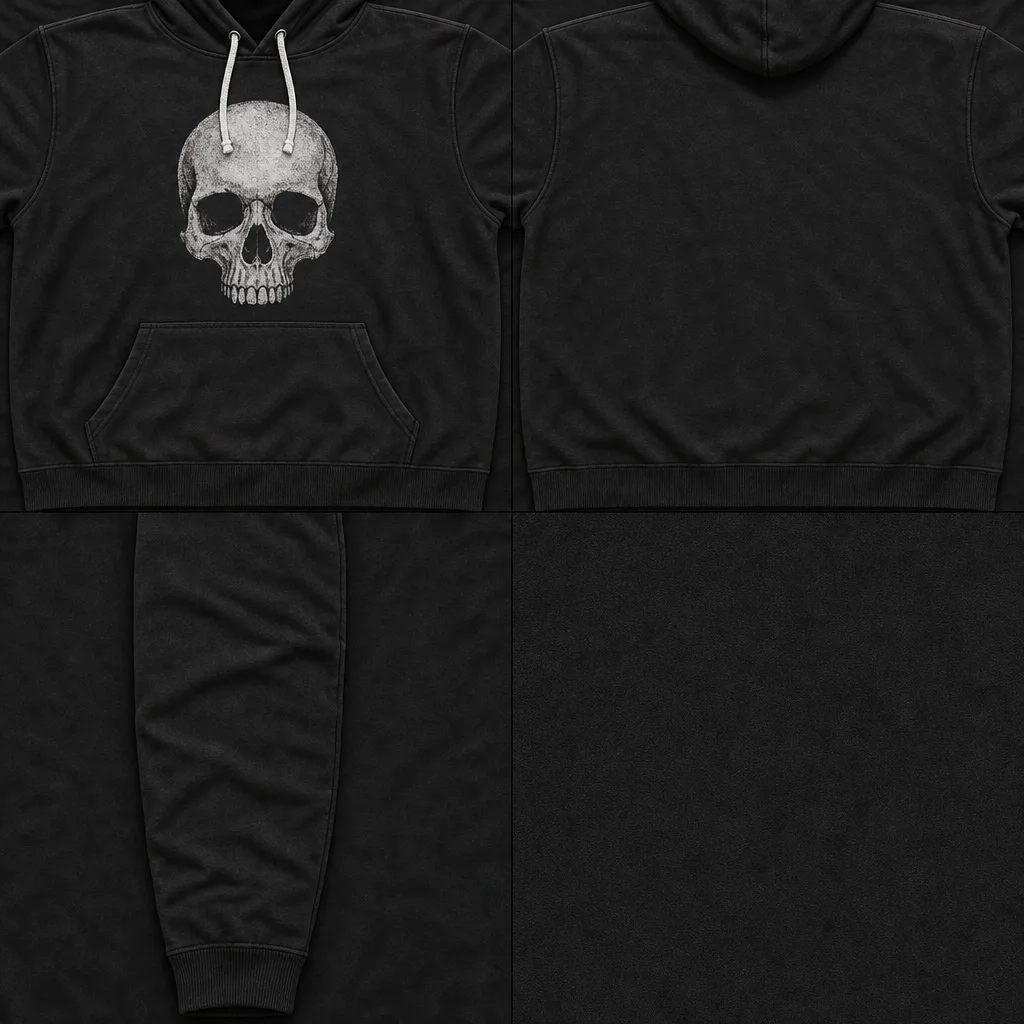
Describe a whole garment, like “a black hoodie with a white skull and drawstrings”, and get the front, back and sleeves with real shading, ready to customize.
More free tools
Pick the page that fits what you’re doing.
Roblox shirt tester
Upload any shirt, pants or t-shirt image and see it on a 3D avatar before you pay to upload it.
Open the tester →TemplateRoblox shirt template maker
Blank and labeled 585×559 templates, and what each box on the template is.
Open the template maker →PantsRoblox pants template
Blank and labeled pants templates, and a pants maker on the avatar.
Get the pants template →T-shirtRoblox t-shirt template
The 512×512 chest picture: a blank template and a t-shirt maker.
Make a t-shirt →ShadingRoblox shading template
Transparent shadows and folds for 15 clothing styles. Lay one over your design.
Get shading templates →DownloadRoblox shirt template downloader
Paste a catalog link to see a classic shirt’s template on the 3D avatar and save the PNG.
Open the downloader →How to upload your shirt to Roblox
From the Roblox Creator Dashboard, in a web browser.
- 1Test it for free. Try it on an avatar here or in the shirt tester. Roblox Studio testing is free too.
- 2Open the Creator Dashboard. Go to Avatar Items, then the Classics tab, and drop in your PNG.
- 3Pick the type and name it. Set Asset Type to T-Shirt, Shirt or Pants, add a name and description, and upload.
- 4Wait for moderation, then sell it. Once approved, open the item, turn on On Sale and set a price.
Uploading costs 80 Robux per item (not refunded if it’s rejected), and putting it on sale takes a refundable 10 Robux publishing advance. Your Roblox account needs ID verification (yours or a linked parent’s) before you can upload. Roblox’s guide.
The maker is free. Really.
Making and downloading shirts, pants and t-shirts is free forever, with no account and no watermark. Only AI-generated designs use credits.
Free
$0
- Every style, fabric, detail and sticker
- Unlimited downloads, no watermark
- No sign-up
AI designs
1 free
- Describe a whole garment, get it shaded
- 1 without signing up, then 3 free every month with Google
- More with a plan or a credit pack
Questions
Is the Roblox shirt maker free?
Yes. Making and downloading shirts, pants and t-shirts is free with no account and no watermark.
What size is a Roblox shirt template?
585×559 pixels for shirts and pants. T-shirts are a square image, such as 512×512.
Do my images get uploaded?
No. The maker runs in your browser, and images you add stay on your device. The one exception is AI: the description you type is sent to our AI to draw your design.
How does the AI shirt maker work?
Describe a shirt, hoodie or pants and the AI draws the front, back and sleeves (or legs) with shading, then it’s folded into the 585×559 template on your avatar. Your first one is free without signing up, and you get 3 free every month with Google sign-in.
How much does it cost to upload a shirt to Roblox?
Roblox charges 80 Robux per upload, plus a refundable 10 Robux publishing advance when you put it on sale. Your account also needs ID verification.
Can I sell what I make?
Yes, as long as the artwork is yours or you have the rights to it. Everything in the maker’s library is free to use in your clothing.
Is RoShirtMaker made by Roblox?
No. It’s an independent tool, not affiliated with or endorsed by Roblox Corporation.
Your next outfit is a minute away
Free, no sign-up.
Make a shirt